Friday, April 26, 2013

DIY Wedding : Making your own programs

fortytwoeleven diy bride wedding make your own programs


I am down to crunch time so in an effort to save time I went onto Etsy to try to find some premade printable programs. Some that I liked were $80, others as low as $15. After noting some of the dimensions to see how many print on one page I realized that a lot of them are 2 per page, cutting the 8.5x11 down to 4.25x11. So I resorted back to my standard thought any time I see pretty much anything…. “I could make that”… It only took me about an hour to get everything done.

I started out by editing the size of the paper down to the 4.25x11 but then realized when it came time to print that it wouldn’t print multiples per page the right way… so I changed it, and it is EVEN EASIER. I swear. I hope all those DIY brides read this and realize they can do it themselves!

I used a banner from a free digital kit I found on Persnickety Prints. I also used a glitter heart from Design Editor (follow her blog, you won’t regret it) I have a massive amount of digital scrapbooking supplies, all free. If you are looking for some elements to use I suggest starting at Quality DigiScrap blog. You can find just about anything for your wedding theme. Don’t forget about clip art and using google images or even engagement photos.

Now… Onto the tutorial…

Open Microsoft Word. Let’s setup the document to make 2 programs per page. The layout should automatically be portrait for Word, if for any reason it isn’t please make that change. Next you will setup the Margins to be “narrow” and then the Columns to be “two”. The beauty of using Word is that it is so user friendly. The setup will automatically make sure the the columns are the same size and there is a margin btwn them. So no worrying about things bleeding over.

01 setup your word document

Next it’s time to start putting in the digital scrapbooking elements or even clip art or the photo.

02 insert your digi art

There are some tricks to using photo files in word. Word will try to keep them in line with text and in the body of the document unless you select the picture and make a few quick changes. These changes will make it where you can more freely move and resize the photo file. But do keep in mind that word will now not recognize that in the body of the text, that means when you start typing your text might overlap the photo. Just enter down a few lines until you are clear of the photo.

03 format digi art

Now we can start editing the text needed for your program. What I saw on most was “the wedding of NAME & NAME” followed by the order of the ceremony events. On my “second” page which will be the back I have the Wedding Partys names and roles. A lot of them also listed a thank you to the guests or a map to the reception venue, as my reception is in the same place and my list got a little long I just kept it to the wedding party names.

I formatted the text to be centered in each column for my preference but that is up to you and how you want yours to look. You can add as many digital elements you like, and you can also use which ever fonts you like. I will show you how mine turned out and some extra tips for formatting the text for better placement.

04 finished product

Fonts Used: Titles – Branboll, Names – Dead Hardy, names and details – Yummy Cupcakes

A few extra settings to help with the spacing btwn lines. If you notice in word when you hit enter to go down to the next line the spacing might be more than you want, like where it says bride’s entrance and then lists the song I wanted those right next to each other. Also where it says the wedding party title and then the names listed.

05 line spacing

Make the spacing 1.0 and it will probably say “remove space after paragraph” and you will want to click that to remove that space. If you want to add it for spacing btwn the different parts of the wedding party like btwn the groomsmen and the bridesmaids just add that space back in in lieu of adding and extra “enter” space.

Printing: Since this is the front and back of your program on one side, all you need to do is insert the paper once printed into your printer the other way around and the program will print the front on the back of the back and the back on to the back of the front… (confused?) I would suggest printing these on cardstock.

Cutting: If you have a paper cutter just line the edge up with 4.25” and cut away, if you print these at Staples they will charge $2.00 to use their big paper cutter to cut multiples at once. I would suggest this to save you a headache of cutting them over and over and over. DO NOT FOR THE LOVE OF ALL THAT IS HOLY TRY TO CUT THESE WITH SCISSORS. Please… just… don’t.

Cost breakdown: I made a call to Staples for pricing and was told for full color front and back it was $1.98 a page and then the additional $2.00 for the full order to cut. I have used Office Depot a lot and have sweet talked them into only charging full color for front and black and white for the back since technically the back is black and white, which will save almost half the cost. For cardstock they typically upcharge you anywhere from $0.07 – $0.25 depending on the paper you choose. If you are printing at home make sure when you print in your printer settings that you have it on either “high quality” or “photo” settings so that you won’t get any streaky lines in your clip art items. (also note that a lot of printers now a days will not feed cardstock from the bottom tray, if you have a feed tray from the back it works, the cardstock will not curl around the rollers on the inside. If you want to print at home but yours doesn’t have a back feed tray then look into “resume” paper, its thicker and has a nice texture to it and will feed through printers.)

I hope all the other DIY brides out there find this tutorial helpful in making there day exactly what they want. I am so glad we are DIYing a lot of our stuff, cuz even if I wanted to find some of the things I want, it just isn’t out there. Our Wedding is not traditional. And I wouldn’t want it any other way!

Much Love,

Tamara

Wednesday, February 27, 2013

Something New Tuesday

So in an effort to broaden my horizons I have dedicated Tuesday to be my “try something new” day. Anything I haven’t done, which is a lot. My bestie over at Through the Lens will also be doing it with me!

Yesterday I attempted to do a Pilates beginner video… I only got about half way through. I’m extremely unfit. So I tried a different one of her videos and I actually got through the whole thing. Granted I only could do certain moves so far and I definitely couldn’t to the rocking back and forth on my spine. I ended up just thunking down on the mat and not being able to get back up.

I encourage everyone to try this out, especially as a beginner!

TRY IT TRY IT TRY IT!

Here is uno helping me:

601519_533339483486_143944406_n

I have to give a shout out to Campfire Chic for motivating me to do more pilates.


signature[4]

Tuesday, February 26, 2013

Motivation Monday

This is a day late, I know! But I did want to share some of the blogs that keep me inspired and got me into following blogs and my renewed obsession with crafts, long before Pinterest! {I do have Pinterest board for all those deemed follow worthy so check it out for even more inspiration!}

All time favs:

  1. Max California - http://www.max-california.com/ – So many adorable clothes for her son and her newborn daughter not to mention the things she’s made for herself! They are a great edgy family that doesn’t do “cookie cutter”.
  2. A Beautiful Mess - http://www.abeautifulmess.com/ – Everything from giveaways to décor to running a blog and a small business to hair how tos to recipes! These two sisters are so inspiring on the way they live their life. Admittedly their style doesn’t work for me but that doesn’t mean I can’t use the techniques in a way that works for me.
  3. A girl and a glue gun - http://www.agirlandagluegun.com/ – lots of glue gun crafts, as you can well imagine, as well as a lot of tutorials on things that I truly feel anybody can do. And I love how she keeps it real (no capitalization and a lot of … heehee)
  4. Sugar Bee Crafts - http://www.sugarbeecrafts.com/ – From clothing to home décor, Mandy is always posting inspiration she has found and tutorials. I like her what I wore wednesday’s because its all reasonably priced clothes or diy clothes!
  5. 52 Weeks Project - http://52weeksproject.com/tagged/project – Every week a new tutorial from around the net that doesn’t take much time. A great way to be crafty without it overtaking an entire weekend. You can also find a bunch of great blogs out there through links.


New favs: (Scrapbooking & etc blogs that I’ve added to keep me motivated to do Project Life)

  1. Campfire Chic - http://campfirechic.com/ – Project life, yoga, and the great outdoors. I am in love with Kam and the way she keeps it real and how colorful her Project Life pages can be! Her blog motivated me to go to a Pilates class at my local community center and buy a yoga mat for at home. (More on that later!)
  2. Harper Finch - http://imharperfinch.blogspot.com/ – Digital scrapbooking supplies and a ton of freebies. I love love love her colors! A lot of designers are more neutral, not Harper! She is sparkly and colorful! I have used her freebie shimmer papers to make a few prints for my friend Amber to have at her desk at her new job! I also plan on making some inspiring prints to hang in my kitchen!
  3. Punk Projects - http://www.punkprojects.com/ – So many different types of things from Project Life to craft projects to photography tips!
  4. One Velvet Morning - http://onevelvetmorning.wordpress.com/ – Lots of Project Life freebies and printables. The good stuff!
  5. This Kalil Life - http://www.kimberlykalil.com/ – Project Life & Digital Scrapbooking along with freebies and layout inspirations!

I read all of the blogs I follow using Google Reader. I have a majority of them separated by Category (Non crafty, FAVS, Scrapbooking, Tumblr {Owls from last night, DLFLN, DGFLN, Target does it again, Disneybound}, Food, Friends, Nails). I try to keep up with them but sometimes it gets to be so overwhelming I just mark all as read and start fresh! I recently deleted about 20 that no longer posted or were no longer posting anything relevant to me (aka a lot of giveaways for things I don’t want or just sponsored posts) but then added about 10 new scrapbooking blogs by going through my Pinterest boards and seeing if I had pinned several things from the same blog.


Much love my friends! (also go follow these guys, or at least check out their blogs and or Pinterest pages!!!)

signature

Wednesday, February 20, 2013

Wedding Workshop Wednesday

Today on Wedding Workshop Wednesday I’d like to share the specific items that I found (through blogs and mostly Pinterest) that we will DIY for our wedding! {People doing the DIY projects include: all of my bridesmaids, a couple of awesome friends, and my mom}

First up the flowers:

I found this awesome tutorial on paper flowers over at ellinee. I saw a bouquet on etsy that was made from books and went searching for how to make my own book page roses and the best one I found was hers. Others have you cutting out each and every petal separately. Ain’t nobody got time for that! I will say for ours the center I did 3 petals instead of 2 and I also added another 4 petal set to the stack. It takes 3 pages to make 2 flowers, we used both paperback size (the larger size not the little ones) and hardback size. I picked up a couple Harry Potter books at flea markets and my maid of honor was nice enough to donate her old paperbacks that had been a little worn out by her kiddo.

Our version:

2013-01-05 21.12.032013-01-06 15.45.152013-01-27 15.18.25

This is the inspiration for the guys boutineers(I constantly misspell that word so please just ignore it if I do it again).

I have a tub of old comics I’ve picked up here and there for a couple bucks. Time to make them useful! I might even let each groomsman pick out which comic they want…

Next up: Décor. You have to have something to put the flowers in right? I have two milk crates full of bud light platinum bottles, such a pretty blue color. And this is what I plan to do with them:

Right now all I have done is the labels off of about half. The best and easiest way to get the label off the platinum bottles is with a razorblade and just scraping small pieces at a time.


I’ll be back with more Wedding Workshops in 2 weeks!


Much Love

signature

Wednesday, February 6, 2013

Wedding Wednesday

You may not know, if you don’t know me, but I got engaged on Christmas and I am in full wedding planning mode. We have actually been planning the wedding since last spring (you have to book stuff way way way in advance here, it’s crazy!)
I thought I would share with the blog-o-sphere what I am doing, where I found inspiration or tutorials and the true cost of things and doing them the DIY way.
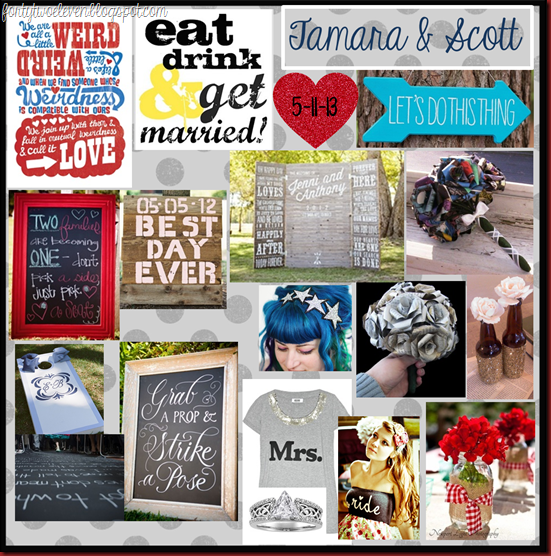
Lets start with my wedding mood board: (click picture to see my Pinterest board)
wedding inspiration board mood board
*The red framed chalkboard became my inspiration for color scheme. Red, Black, Blue & White. And I mean Cherry-fire engine-candy apple red and cobalt blue.
*The alter I found via Pinterest is just what I had in mind. We wanted something that would block the view behind us, have personality, and be something we could DIY.
*I have never been one for flowers, so when trying to figure out what to do for flowers and budget… I came across the paper flower bouquets made from books and comic books… I fell in love with them instantly… bonus: WAY CHEAPER.
*I am personally partial to all things red so when I was trying to find some more blue to bring in I saw the beer bottles that had been glittered/spraypainted/ modge podged and thought about the new Bud Light Platinum bottles that are a really pretty cobalt blue. With the help of my Maid of Honor and one of her friends they drank enough (over several weekends) to get me almost 50 bottles! I will say tho that these are the HARDEST to get the labels off! More on that later
*I definitely want a photobooth. We are still working out logistics on having one setup since my camera doesn’t have a remote. My MoH will def be making the “Grab a Prop & Strike a Pose” sign, she has such pretty handwritting.
*I was looking for venues in our area and kept getting sticker shock for how expensive some places were and the restrictions they had on types of food and drinks. I was talking with my Mom one day and I was in the process of telling her about the prices and she asked where my friend Jexica was getting married (She deserves her own post for all the DIYs we did for her wedding, look for that in the future) and she was getting married outside at her grandpa’s pasture… So my mom just said.. “what about Memaw & Papaw’s?” It hadn’t even dawned on me that we could get married there and save literally thousands of dollars! They have 3 acres out in Lonoke that backs up to a nice big field (occasionally there will be horses or cows out there but rarely). Plenty of room for parking, 3 bathrooms for guests, a nice big deck to put the food on… This is the best idea my mom’s had for the wedding!
** You might notice a lot of I instead of We… in true manly fashion… Scott is letting me do what I want, within reason of course. But I still show him all my ideas and he just keeps saying “whatever you want baby” I will say tho that it was his idea for us to make our own cake… yes you read that right, we are making our own wedding cake. I’ll have a special post for all the tips I found online and our trial run we do to test the batter amounts and things like that.
On the next Wedding Wednesday: Paper flowers. Look for it in two weeks!

signature

Monday, January 28, 2013

Motivation Monday

A new year, a new plan. I have planned out my blog posts and even have ideas for the whole next month written out. I made myself a blog mini-binder. Nothing fancy, just a half size binder and blank pages.

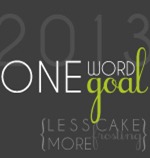
Mondays will be Motivation Monday’s! For today I am going to tell you all about my “one word, one goal 2013.” It’s more than a New Year’s resolution. It’s a goal for the whole year. A mantra.

LCMF-One-Word-One-Goal-13

I first saw about “One word, One goal” on Less Cake More Frosting last year and I just loved it. When 2012 went by so fast that it is now 2013 and I am going to participate!

My Word for 2013:

fearless

Fearless!

Fearless in trying a new craft fair. Fearless in applying for a new job and trying something new. Fearless in planning our wedding, it’s for us nobody else. Fearless in trying new crafts and going all in!

I hope to see you all for my next blog posts!


Tamara

Thursday, November 8, 2012

Things I love Thursday

I love our new house! So much room and storage and places to do things! Ahhh!

Tamara

Friday, October 12, 2012

Razorback Background–For Fangirls

Another Hogs background for the gal fans out there.

arkansas razorbacks go hogs 10 1920x1200

Enjoy!


~Much love,

Tamara

Thursday, September 6, 2012

Things I love Thursday : Arkansas Razorbacks

In Junior High we had to pick an extra curricular activity. I chose band. I loved being part of the band. In High School I decided to try out for the Color Guard in Marching Band. I loved it. Every single minute of it. The routines, the muscles I gained from spinning, the football games, the crowd, the true school spirit. Oh how I miss those days.

Ever since then I have loved football and school spirit. Admittedly, I can’t follow along with what is actually happening in the game as I am just recently learning what everything is and who all the players are and their job on the team. {Thanks Scott and Amber}

Since I graduated college and have moved out into the real world I really missed having a team to cheer for and to watch when football season came around. Luckily my state has a FANTASTIC college football team – The University of Arkansas Razorbacks! Razorback football is in a whole new dimension from what my college football was. The tailgating for a Hogs game is HUGE!

I’m working on making myself a game day dress {I’ll post instructions on that!} and in the mean time I decided it was time to make myself a desktop background. Everything I was finding online was plain, boring, blah. I’m a bit of a girly girl these days, who knew?! So I made some myself {Using Microsoft PowerPoint! No fancy software needed}, and I thought I’d share a few backgrounds each week to get everyone pumped about the games!


First Ones Up: Polka dots… oh how I love polka dots!

arkansas razorbacks go hogs 2 smarkansas razorbacks go hogs 3 smarkansas razorbacks go hogs sm

Download the zip file here.

You can download all 3 in a zip file from google docs.

{Disclaimer: I am not making any money from these backgrounds and no copyright infringement is intended. Chevron pattern used was obtained from Design House Digital, Polka Dot pattern used was obtained from Katie’s Wish blog}

ENJOY!


~Tamara

Thursday, August 16, 2012

Things I love Thursday: Evernote

I first downloaded Evernote on my Android phone to keep track of those random things I came across online that I wanted to go back to (usually giveaways that I wanted to enter, one day I will win a Silhouette Cameo!). I remembered that you could get Evernote for your computer too and downloaded it onto my new laptop. I had been looking for a good way to keep track of my thoughts and ideas for the wedding and my Pinterest board is a bit over full (anybody else?) and I wanted to make my wedding master list and have everything there in WORDS and PHOTOS.

Evernote

I can break things down into Notebooks and then Notes… so I have lists and then sub lists. Does anybody else get excited about sub lists like I do? I can break down things and think about them one tiny element at a time.

And I can do this from my laptop AND my phone and they sync together so I can work on a note tonight and then go off somewhere tomorrow with my phone and be able to pull it up and remember what I need or the look I’m going for.

I really think this will be a life saver for the wedding!

{edit btwn writing this and posting it: I also added another “notebook” and converted my massive craft to do list over to it. I had a 19 page list in categories in my purse for the last month. And now it’s in Evernote!}

Much list love to you all,

Tamara

Wednesday, August 15, 2012

Home Management Binders Inspiration

I’ve been pinning and pinning and pinning (no surprise there) and I have accumulated several pins on my Tips, Tricks, Cleaning & Organization board that involve Home Management Binders. I also noticed that several of my close girlfriends were also pinning them. So I thought I’d throw together a post on some binder inspiration.

I also want to go step by step and make one for my home. I’ve also asked a couple of my girl friends to help me out and make one too. We all have different styles and it will be fun to see how different they are!

forty two eleven blog home management binder setup inspiration

Pinned Image

This is a full printable set you can get from Crystal Wilkerson that goes into a mini size 3 ring binder. The colors are bright and fun. She also includes motivational quotes to put throughout as well. The set will run you $30-35 depending on which one you purchase. It can be purchased here.

The Nest Effect has several posts one by one on each section of her binder, you can purchase her set here for $45. Her binders are based on the Dave Ramsey method of debt repayment. Her sections include: Debt, Savings, Budget and Home Information.

Over on Twenty62 blog you can find another section by section posts on how she set hers up. She also gives you printable versions for FREE. Who doesn’t love free? Her sections include: Cover, Calendar, Contacts, Meal Planning, and Cleaning.

Another fabulous setup in a mini size binder from A Bowl Full of Lemons. She shows you how she set up all her tabs and such using a lot of Martha Stewart for Avery products. Her sections include: Monthly, Notes, To do, Menu planning, Budget, Blog, sponsors, ideas, giveaways, income, checklists, and School. She also uses color coding to help keep organized (I don’t know about you but Color Coding works wonders for me and my visual brain!

Over on Sprouting a Little Nostalgia she has a really big binder! Her sections include: birthdays, week at a glance, daily, new years resolutions, thoughtfulness planner, to do lists, long term to do, home balance sheet, blogging to do list, carpool to do, a “honey-dew” list, recipes, menu planner, grocery list, cleaning, faith, contacts, health, family night, infertility, important numbers (docs, etc), homeschool, fitness, baby sitters, home repair, business, goals, parenting goals, hobbies, college, pets, vehicles, parties, warranties, Christmas, family time, passwords, organizing, taxes, notes, and finally blogging. Told you it was a big one. She breaks down each section and what she has in it and even links to printables she used.

Files12

Over at Dawn at Home she doesn’t use a binder but instead uses a file crate with 52 folders with each week on them. She also staples paper to the front cover to use as her weekly planning sheet. I think this is an excellent idea too. You could put birthday cards into the week that they are in, have bills in the week. You just pull out the week you are in and work through them that way. She also sticks a month at a glance calendar in the front with a note pad. I think this is a great alternative to a binder! (especially if you are home schooling like she is). I also think this would be great to put memories from that week in to the file folders to scrapbook later (school projects, ticket stubs, photos, etc).


I hope these links and inspirations help you get motivated to make a Home Management binder for yourself. I will be back soon with ways to start out your binder, including recovering old binders, where to get the best prices on supplies, and ways to make your own tabs!


See you soon!

Tamara

Monday, August 13, 2012

Making your own ephemera for art journals

I’m not sure I’m using the right word here… ephemera… Essentially I'm going to show you how to make your own art or additions or elements for scrapbooking or art journaling. ((someone want to help me out with the word I’m looking for here?))

I wanted to make a small journal for all the quotes I love and have been pinning on my Pinterest that I wanted to have to display. I thought about making a small clip board and changing it everyday and then I remembered I have 12 empty half size spiral notebooks. And that would work perfectly for making a quote coffee table book.

I printed them all off into small sizes. I was trying to figure out a quick way to do this, after attempting to put them all into a PowerPoint and arrange them I realized that I just had too many. Then {LIGHT BULB} it hit me! Windows is smarter than I remember. And I’m going to show you how I made these:

Embellishment

First I went through all my quotes pinned and saved the photo files of my favorites. Check what type of quality they are, some of them I saved straight from Pinterest and others I clicked through to the website and saved from there. I saved them all in one separate folder to make this process faster.

art journal quotes 1

Then you select all, right click on any photo, the third selection down is print:

art journal quotes 2

Windows will pop up a photo print wizard. Select the printer you will be using (I tested as a pdf to see how the photos would look). Then scroll on the right hand side the size you want. I selected 3.5x5 to give me four per page. You can play around with all different sizes.

art journal quotes 3

Notice how the preview shows the one in the lower left slightly cropped? That can be fixed by unchecking the box next to “fit picture to frame.”

art journal quotes 4

That looks much better, doesn’t it? Then all you have to do is load up paper in your printer and print away. I used Cardstock for this but you could use anything you wanted.

art journal quotes 5

Here is an example of how one page turned out for me. Then I got out my paper trimmer and set to work.

You could use this for your own journaling digital elements, photos in smaller formats for mini-albums, or for quotes in wallet size to keep with you at all times!

Disclaimer: I do not own any of the artwork shown, for links to who does please see my Pinterest board. I am making no money from this tutorial or the finished album I am making.


Hope this helps you make some custom elements for your scrapbooks!


Much Love,

Tamara

Wednesday, July 25, 2012

Site updates

New layout, new name, and new background. I really want someone to come in and spiffy the place up!

I'm full of ideas and I am working on ways to get them into reality.

I'm looking into resetting some tags.

And maybe a new laptop!